Sales CRM
Screens
Overview
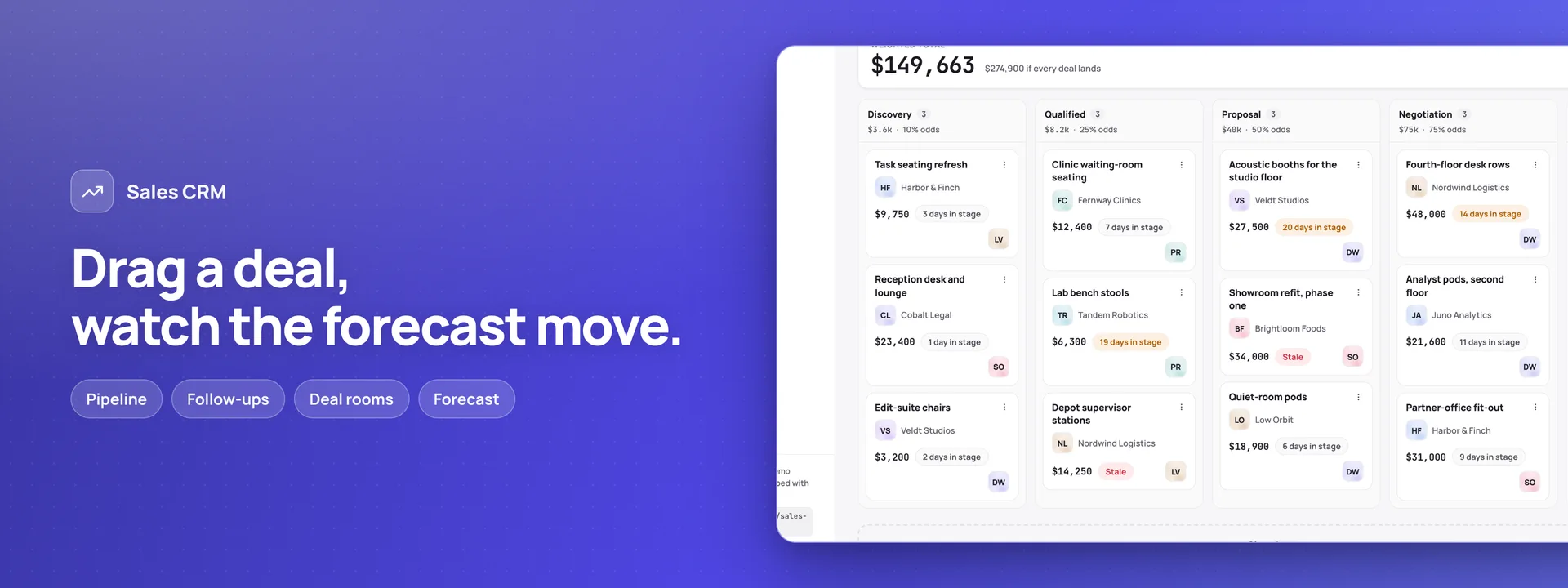
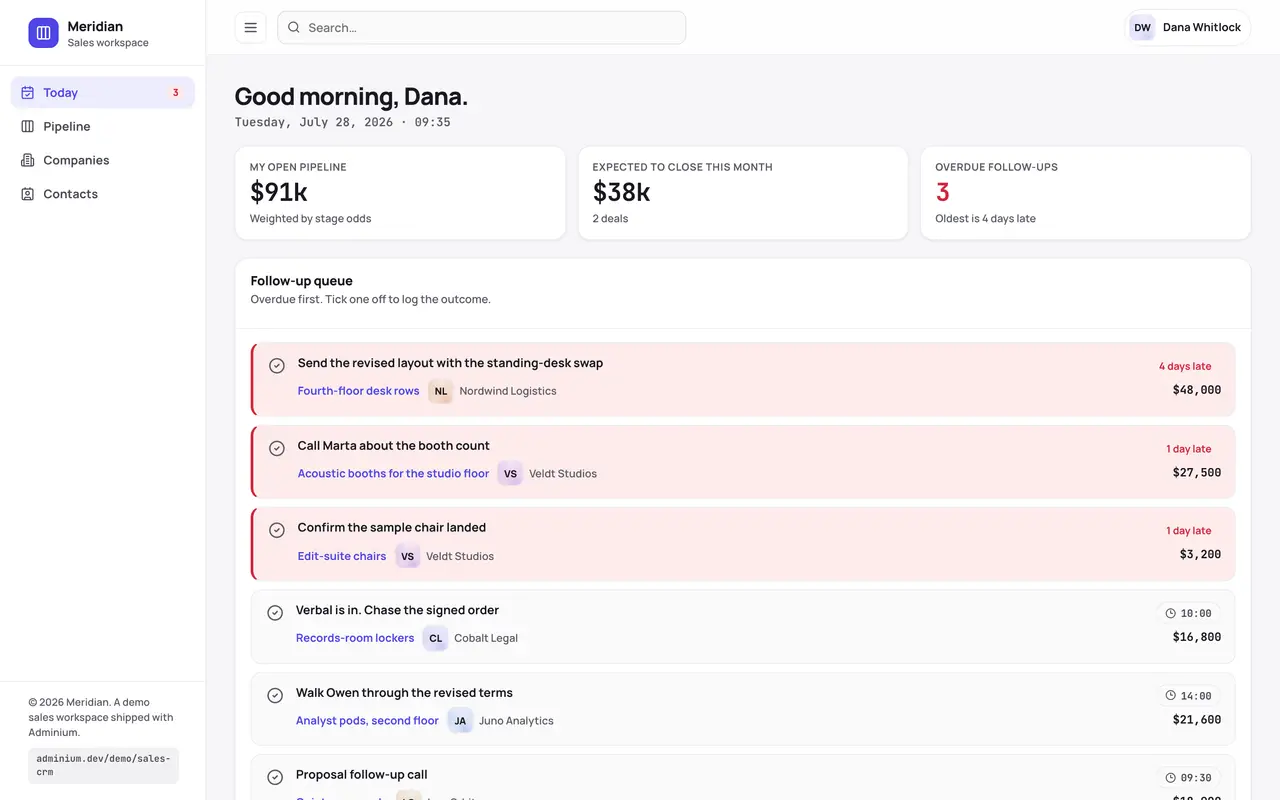
A sales workspace on your own database, for a business that sells anywhere, in its own currency. Each rep starts on Today: their open pipeline, what closes this month and a follow-up queue with the overdue first. The pipeline board shows open deals by stage, each column’s total weighted by that stage’s odds; a card moves by drag or by keyboard, and every move goes into the deal’s history. The deal room holds a deal’s calls, notes and meetings, its quotes, its site visits and comments that mention a colleague, and a deal can be handed to someone who can open it. Quotes: with Invoices & Receipts, a quote is numbered, taxed and sent from its deal. A line takes its list price from the price list, and a quote further under list than the install allows, or with a line that has no list price, waits for a sales manager’s yes before it can go out. The customer opens it by a link, with no account, and accepts it once. A deal’s amount is its newest sent quote. A manager has the team view: the forecast by month, the deals sitting longest, stage health, why deals are lost, nudges, targets, one-to-ones nobody else can open (not even an administrator), the weekly meeting, and cover while someone is away. Accounts holds companies and contacts, renewals and referrals, a pasted list turned into companies, and territories on a street map that needs no key and no account. The front desk types in an enquiry when somebody rings and passes it to a rep; trade-show leads are pasted in. With the Inventory add-on, Supply sets stock and lead times against what open deals need, beside a supplier scorecard. Four more parts install switched off, for a business that also delivers and fits what it sells. Showroom and samples books visitors in, lends samples and chases the ones not back. Jobs on site makes a job when a deal is won and books its deliveries onto a crew’s day, with the day sheet, the route and the snags. The field crew works from a phone: the day’s visits, the ticks, and signing the job off with the customer’s signature and photos, which waits while a snag stops it. After the job books an aftercare call and keeps complaints and warranty claims; Vehicles and crew keeps the vehicles with their checks and fuel, the time sheets and the certificates. Each role sees its own rows: a rep their own deals, a manager their team’s, an account manager a deal once it is won or while on it, a marketer no deal at all, the field crew no amount. The manifest creates 75 tables in your connected database, the app’s screens and nine roles. Ten rules the app works by are on at install; ten that tell people by email are off until you switch them on. Eighteen emails, eight languages, and Meridian, a sample business of 688 rows. Needs Adminium 0.3.30. It updates a 0.2.0 install in place: every record stays, and the four new parts arrive switched off.
Capabilities
- Sends email
- Realtime
- File storage
What you get
Tables it adds75
- stages
- deals
- deal_stage_changes
- follow_ups
- activities
- lost_reasons
- price_list
- quotes
- quote_lines
- deal_amount_changes
- comments
- saved_views
- saved_searches
- nudge_snoozes
- deal_members
- deal_marks
- site_visits
- visit_notes
- visit_agreed
- companies
- contacts
- territories
- territory_places
- renewals
- referrals
- reps
- targets
- one_to_ones
- one_to_one_sessions
- coaching_plans
- coaching_areas
- actions
- meetings
- meeting_slots
- meeting_decisions
- threads
- thread_members
- messages
- starters
- starter_steps
- covers
- cover_notes
- enquiries
- shows
- showroom_spaces
- showroom_bookings
- samples
- sample_loans
- sample_chases
- display_pieces
- jobs
- crews
- crew_members
- crew_days
- job_visits
- sign_offs
- snags
- delivery_notes
- delivery_note_lines
- waste_removals
- feedback
- complaints
- warranty_claims
- deal_stock_needs
- vehicles
- vehicle_checks
- vehicle_faults
- fuel_fills
- time_sheets
- time_sheet_lines
- certificates
- subcontractors
- insurance_incidents
- outbox
- settings
Created fresh, or mapped onto your existing tables at install.
Pages your dashboard gains19
- TodayA rep’s open pipeline, what closes this month and the follow-up queue, overdue first; This week and site visits beside it.
- Pipeline boardOpen deals by stage, each column’s total weighted by the stage’s odds; drag a card or move it with the keyboard. A manager sees the team’s.
- Deal roomOne deal’s calls, notes and meetings, its quotes, site visits and comments that mention a colleague; hand it over to someone who can open it.
- QuotesEvery quote and its newest version, each line priced from the price list, and the link a customer opens with no account to accept it.
- ApprovalsA quote further under list than the install allows, or with a line that has no list price, waits here for a sales manager’s yes.
- Team viewThe forecast by month, the deals sitting longest, stage health, why we lose, nudges, targets, one-to-ones, the weekly meeting and cover.
- Companies and contactsAccounts with their people, their deals and one history; renewals, referrals, and a pasted list turned into companies.
- TerritoryTerritories and companies on a street map that needs no key and no account; a company placed by its town or a dragged pin.
- Team inboxEnquiries with no name against them, typed in when somebody rings and passed to a rep; trade-show leads pasted in.
- Showroom bookingsVisitors booked into the showroom’s spaces, confirmed, moved or cancelled by email, with what to set out; the follow-ups after a visit.
- Sample librarySamples lent to a customer and the chase when one is late back; the display stock on the floor, and the pieces that look tired.
- DeliveriesA won deal’s job and its visits still to come: book one onto a crew’s day or drag it there, with the day sheet and the route.
- Sign-off and snagsEach job signed off on site with the customer’s name, signature and photos; the snags still open, the ones that stop a sign-off, delivery notes and recycling.
- My dayThe field crew’s phone: the day’s visits with the address, who to ask for and what is on the van; the ticks, a snag, and signing the job off.
- After the jobAn aftercare call booked when a job is signed off; what customers said, complaints with the days to answer them, and warranty claims.
- Stock and lead timesWith the Inventory add-on: what is on the shelf and on order against what open deals need, and a supplier scorecard.
- VehiclesEach vehicle with its service, inspection and tax dates, walk-round checks, faults and fuel; training and certificates, subcontractors and insurance claims.
- Time sheetsA week’s hours person by person, on the job and travelling, sent back with a note or signed off; the crew fill in their own on the phone.
- SettingsSelling, the price list, the reps, working time and places; the crews and the aftercare calls; the app’s parts, to read.
Roles it pre-builds9
- adminEverything in the app and its settings, except the private one-to-ones and coaching, other people’s actions and other people’s conversations.
- sales-managerThe deals, quotes and visits of the people they lead; approves or declines a discount; sets targets and cover for their own people.
- repTheir own deals and what hangs on them — follow-ups, activities, quotes, visits; reads companies, contacts and the price list, which they cannot change.
- account-managerCompanies and contacts, renewals, repeat orders and referrals; a deal once it is won, or while they are on it; aftercare calls, complaints and warranty claims.
- marketerEnquiries and trade shows, companies and territories; contacts with their address and phone masked; no deal and no amount.
- front-deskThe team inbox: types in an enquiry and passes it to a rep; makes a contact for a caller; with the showroom, its bookings, samples and display stock; no deal.
- ops-managerSupply’s stock and supplier scorecard, from the Inventory add-on; jobs, deliveries, crews and snags; vehicles, time sheets, certificates and subcontractors; a won deal’s name, never an amount; no company or contact.
- crewTheir crew’s visits, ticks and snags; signs a job off with the customer’s name, signature and photos; their vehicle’s checks, faults and fuel, their hours and certificates; no amount anywhere.
- read-onlyReads and exports; nothing private, no actions, no conversations.
Settings you configure14
- How far under list a quote may go before a manager approves it
- Days a quote stays valid, and the warning before it runs out
- Days before a deal that has not moved reads as warm, then stale
- When a quiet, stuck or soon-closing deal earns a nudge
- Working days and hours, and the day a week starts
- Where visits start from, and kilometres or miles
- Days before an enquiry turns cold
- When the showroom opens and closes, and where it is
- Days a sample is lent before it is chased
- Months before a display piece looks tired
- Days to put a snag right
- Days after a sign-off the aftercare call falls due, and who makes it
- Days to answer a complaint, and when a warranty claim turns red
- Warnings before a certificate runs out or a vehicle inspection is due
Run it with your own data
Sales CRM needs somewhere to keep your data. Answer one question and we will show you the shortest way there.
Do you already use Adminium?
Start with an Adminium
Sales CRM is installed into an Adminium, which keeps its data in your own database. So you start with an Adminium, then add Sales CRM to it from there.
Start one on your own machine
npx @adminiumjs/adminium try No database needed — it asks you for one when it is ready. Once it is running, open “Hosted apps” in its Studio and install Sales CRM from the online app catalogue.
Where is your Adminium?
The address you sign in to, for example https://admin.yourcompany.com
That does not look like a web address. It should start with https://
Sales CRM runs inside your Adminium
Install it from your Adminium
Installing it creates the tables it needs in your database and adds its screens to your Adminium. There is nothing else to deploy.
- Open “Hosted apps” in Studio — the button below goes straight there.
- Under “Apps you can install”, the apps of adminium.dev are listed. On an Adminium installed before 0.3.16 the list may be off: press “Show what is available” there first.
- Find Sales CRM and press “Install”.
- Read what it adds and press “Install” to confirm. Nothing is created until you do, and anything Sales CRM needs is installed with it.
Or start from the source
Clone it and run it anywhere — the README covers every option.
View on GitHub